
Registering the wireless modules
You can register up to seven wireless modules in the LR8450-01.
It is recommended to follow the instructions of the configuration navigator when you register the modules for the first time.
To use the Z3231 Wireless LAN Adapter, you need an instrument with software version 2.21 or later and a wireless module with software version 1.50 or later.
Registering the wireless modules with the configuration navigator
Following the instructions from the registration guide, you can register the wireless modules.
“1.16 Configuration Navigator (Quick Set)” in the Instruction Manual.
Connection of the AC Adapters is not required when they are being battery-powered.
The configuration navigator menu will be displayed.
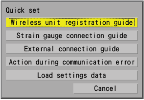
Following the instructions from the registration guide, register the wireless modules.
-
List method: Allows you to choose wireless modules from the list of the modules available for registration.
-
Auto connect method: Allows you to use the keys on wireless modules to register.
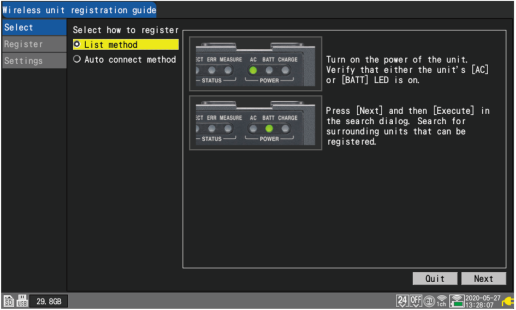
Once the registration completes, the wireless module’s LED will light up.
You can check the radio-wave strength with the instrument’s icon.
Registering the wireless modules with the settings screen.
You can search for the wireless modules connectible with the instrument to register the modules.
“1.2 Registering Wireless Modules” in the Instruction Manual.