Controlling the Instrument with Communication Commands
This section describes how to control and communicate with the instrument by sending communication commands from a computer.
The instrument and computer must be connected using either a USB cable or a LAN cable.
“Connecting the instrument to the computer with a USB cable” in the Instruction Manual.
“Connecting the instrument to a computer with a LAN cable” in the Instruction Manual.
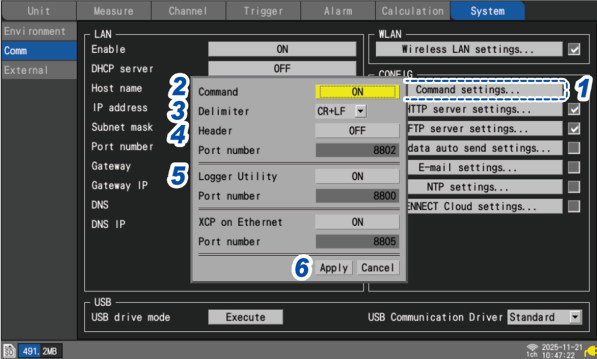
The instrument must be configured in order to control it using communication commands.
1 Press the ENTER key while [Command settings...] is selected.
The settings window will open.
2 Under [Command], select whether to use communications commands.
3 Under [Delimiter], select the communication command line feed code.
4 Under [Header], select whether to add a header to command responses.
5 Under [Logger Utility], select whether to use Logger Utility.
6 Press the ENTER key while [Apply] is selected.
The settings window will close.
For more information about communication commands, see the Communications Command Instruction Manual.
The “Communications Command Instruction Manual” can be downloaded from Hioki’s website.
Information on download site