
Connecting a resistor
Applicable modules: U8551, LR8531
You will need: a flat-head screwdriver (with a tip width of 2.6 mm) and an input cable (for resistance measurement)
Recommended wire diameter
|
Single-wire |
Diameter of 0.32 mm to 1.29 mm (AWG 28 to 16) |
|---|---|
|
Stranded wire |
0.2 mm2 to 0.52 mm2 (AWG 24 to 20) |
|
Standard stripping length |
9 mm |
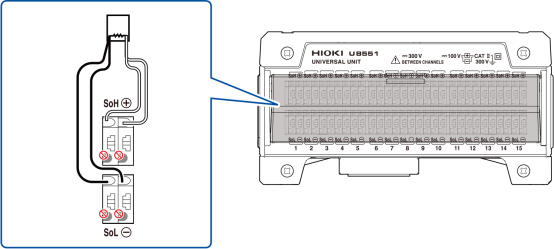
Connect the resistor using a 4-wire setup (the instrument cannot measure 2- or 3-wire setups).
One side of the resistor: Insert the wires into the positive terminal (red) and the SoH terminal (red).
Other side of the resistor: Insert the wires into the negative terminal (black) and the SoL terminal (black).
The cable will be locked in place. Pull gently on the cable and verify that it does not come out.